ip
Nacho User Guide
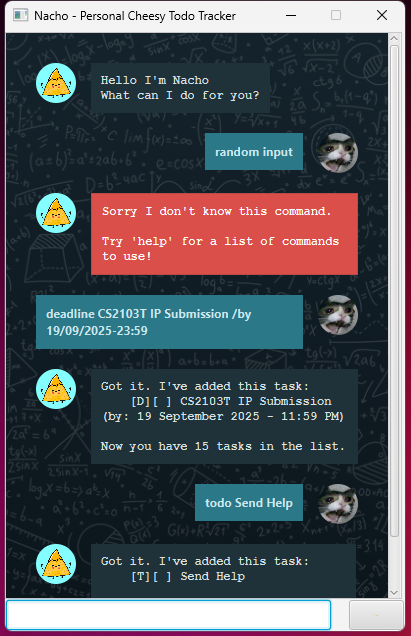
Say Hello to Nacho, your on the fly task management companion!
With Nacho, keeping track of your tasks is just a easy as grabbing a snack! 😜 (Guacamole not included)
How to Run
Pre-requisites
- Java 17 installed and configured in PATH
- Download the latest JAR file from here
Nacho supports 2 types of interactions
- (Default) GUI
- CLI
GUI → Simply run the JAR file
CLI → Run the file Nacho.java from ‘src/main/java/nacho’
- Note: Nacho will create the directory and file
./data/mainStore.txtin the local directory if it does not exist on intial run -
File will be used to store tasks between sessions
Types of Supported Tasks
| Task Type | Description |
|---|---|
| ✅ Todo | Quick Task to note down |
| ⏲️ Deadline | Task with a specific due date |
| 🗓️ Event | Task with a Start and End |
Task Creation
🗒️
- Words in <> are placeholder elements
- Words in () are optional elements
- Extraneous parameters for commands without parameters will be ignored
Todo
Format: todo <newTask>
Example: todo Eat lunch at the Terrace after CS2101 Presentations
Output (CLI shown here):
    -----------------------------------
    Got it. I've added this task:
        [T][ ] Eat lunch at the Terrace after CS2101 Presentations

    Now you have 17 tasks in the list.
    -----------------------------------
Deadline
Format: deadline <newTask> /by <formatted_datetime>
(formatted_datetime: dd/MM/yyyy-HH:mm)
Example: deadline Submit IP Final Product /by 19/09/2025-23:59
Output (CLI shown here):
    -----------------------------------
    Got it. I've added this task:
        [D][ ] Submit IP Final Product (by: 19 September 2025 - 11:59 PM)

    Now you have 18 tasks in the list.
    -----------------------------------
- Note that
will be parsed into a DateTime object subsequently
Event
Format: event <newTask> /from <Start> /to <End>
Example: event Recess Week! /from 22 Sept /to 28 Sept
Output (CLI shown here):
    -----------------------------------
    Got it. I've added this task:
        [D][ ] Submit IP Final Product (by: 19 September 2025 - 11:59 PM)

    Now you have 18 tasks in the list.
    -----------------------------------
- Note that for Event Tasks
and are treated as Strings and not parsed into DateTime objects
Features
Help
Command to go for when the user needs a quick lookup on the usage of commands Nacho provides
Example: help
    -----------------------------------
    Available Commands: (Replace <> tags with your content
    list
    todo <task_header>
    deadline <task_header> /by <deadline_date>
    event <task_header> /from <start_date> /to <end_date>
    mark <task_number>
    unmark <task_number>
    find <keyword>
    sort
    delete <task_number>
    -----------------------------------
list
Lists the tasks Nacho is currently storing for the user.
Example: list
    -----------------------------------
    Here are the tasks in your list:
    1.[T][ ] Eat lunch at the Terrace after CS2101 Presentations
    2.[D][ ] Submit IP Final Product (by: 19 September 2025 - 11:59 PM)
    3.[E][ ] Recess Week! (from: 22 Sept to: 28 Sept)
    -----------------------------------
Mark & Unmark
Checks Tasks as done or undone. Target task identified by its index number shown in list.
Example: mark 1
    -----------------------------------
    Nice! I've marked this task as done:
        [T][X] Eat lunch at the Terrace after CS2101 Presentations
    -----------------------------------
- Upon marking a task, the task will indicate it to be marked when calling
list.
Find by Keyword
Searches for tasks containing the keyword specified by the user and displays them as a list.
Format: find <Keyword>
Example: find lunch
    -----------------------------------
    Here are the matching tasks in your list:
    1.[T][X] Eat lunch at the Terrace after CS2101 Presentations
    -----------------------------------
- Note that
*is* case sensitive - Substring matches are supported
Delete
Sorts tasks in database in alphabetical order by task header.
Format: sort
Output:
    -----------------------------------
    Sorted!
    -----------------------------------
- Upon displaying this message, the database will remain sorted in order
Delete
Deletes a task identified by its index number shown in list.
Format: delete <task_number>
Example: delete 1
    -----------------------------------
    Noted. I've removed this task:
        [T][X] Eat lunch at the Terrace after CS2101 Presentations

    Now you have 2 tasks in the list.
    -----------------------------------
Bye
Closes the program after a set timeout.
Format: bye
    -----------------------------------
    Bye. Hope to see you again soon!
    (Closing in 3 seconds)
    -----------------------------------